


By the time a manager schedules a “check-in” about someone’s workload, the problem has usually been building for weeks. The issed deadline, the sudden resignation, the quiet disengagement in meetings: these are late signals, not early ones. The employee’s calendar, inbox, and task history have been telling a different story all along. Managers just haven’t had a practical way to read it.
Burnout builds quietly
Burnout rarely arrives as one dramatic event. It’s usually a gradual shift. A person who once managed their workload comfortably starts absorbing more of it, works a little later each week, and keeps delivering right up until they can’t.
By the time a manager notices the obvious symptoms- missed deadlines, visible disengagement, a spike in sick days- the underlying pattern may have existed for weeks or months already.
Several operational signals tend to show up earlier than the symptoms managers are trained to watch for:
- Consistently longer working hours
- Growing after-hours activity
- Increased weekend work
- Unusual drops or spikes in daily activity
- One employee consistently carrying more work than peers
- A sharp change from someone’s normal working pattern
- Excessive switching between applications and tasks
- Sustained stretches of unusually high workload
None of these, on their own, proves burnout. Someone working late on a Tuesday might just be finishing a task they enjoy. The value in these signals is that they’re worth a second look, not that they’re conclusive on their own.
Gallup’s research points to the scale of what managers are up against: burnout risk increases significantly once employees exceed 50 hours a week, and climbs even higher past 60, though how people experience their workload has a stronger influence on burnout than hours worked alone. Hours matter, but they’re only part of the picture.
Why managers struggle to see the signals
Managers mostly work from a narrow set of inputs: deadlines, deliverables, meeting notes, and whatever an employee volunteers. That’s usually enough to catch a problem once it’s visible. It’s rarely enough to catch one while it’s still forming.
The day-to-day texture of how someone actually works, which hours they’re active, how their load compares to teammates, whether their patterns have shifted, sits mostly outside a manager’s normal view. That gap widens as teams get more distributed. A manager overseeing five people in one office can pick up on subtle changes just by being present. A manager overseeing fifteen people across three time zones, working across a dozen different tools, doesn’t get that advantage.
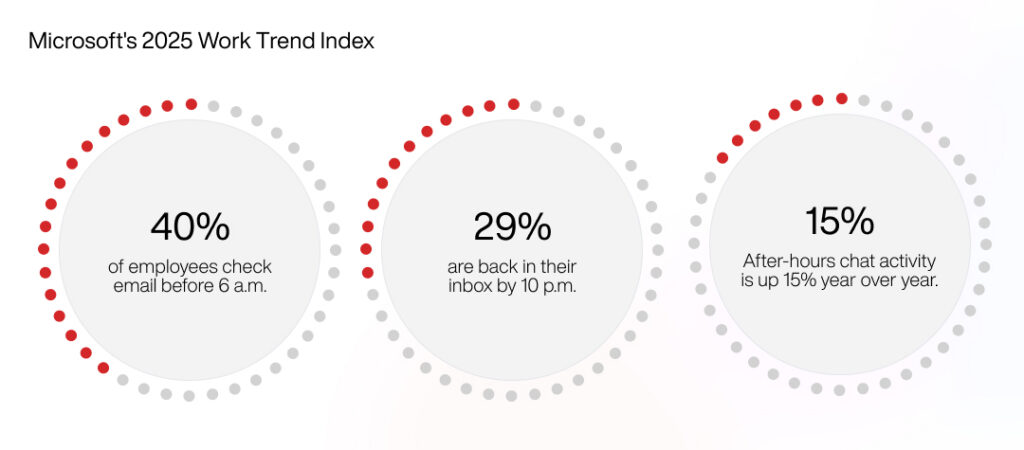
The scale of after-hours work suggests how much activity happens outside a manager’s field of view entirely. Microsoft’s 2025 Work Trend Index, based on data from roughly 31,000 knowledge workers across 31 markets, found that 40% of employees check email before 6 a.m. and 29% are back in their inbox by 10 p.m., with after-hours chat activity up 15% year over year. Most of that never shows up in a status update.
Why traditional monitoring isn’t enough
Traditional employee monitoring answers a narrower question than the one managers actually need answered. It can report how many hours someone logged and which apps they had open. It can’t easily tell you whether a workload is sustainable, whether work is distributed fairly, or whether someone’s normal pattern has quietly changed.
Raw activity data without context is easy to misread. Keyboard activity and time spent in an application say almost nothing about whether the underlying work is manageable. A quiet week could mean someone is coasting, or it could mean they’re deep in a task that doesn’t generate much visible activity. Managers need something closer to interpretation than a raw feed of numbers.
How AI changes the picture
This is where AI-powered workforce intelligence earns its place. Instead of asking a manager to manually compare workload data across a team and several weeks of history, AI can surface the patterns worth a closer look.
A few examples of what that looks like in practice: workload imbalance, where certain employees consistently carry heavier loads than peers; behavioral pattern changes, like someone who typically logs off by 6 p.m. suddenly working past 9 most nights; rising after-hours activity tracked over time rather than as a single data point; teams operating consistently near capacity, before that shows up as a missed deadline; and operational friction, where heavy task switching points to a workflow problem rather than a performance one.
It’s worth repeating: these are signals for human investigation, not automated conclusions. AI can surface a pattern. It can’t tell you why the pattern exists.
From workforce data to workforce intelligence
This is the gap platforms like SpectoSoft are built to close.
SpectoSoft brings activity data from across a team’s devices and applications into one dashboard, then applies AI to help managers make sense of it instead of reviewing it line by line. Its AI-powered insights are built to surface productivity trends, workload distribution, and unusual changes in team or individual activity automatically, and its natural-language AI search lets a manager ask something like “who is overloaded with work” or “show the team’s productivity trend for the last month” and get an answer pulled from actual activity data. Weekly AI summaries can flag things like unusual after-hours activity on a couple of accounts, giving a manager a starting point instead of a pile of raw logs to dig through.
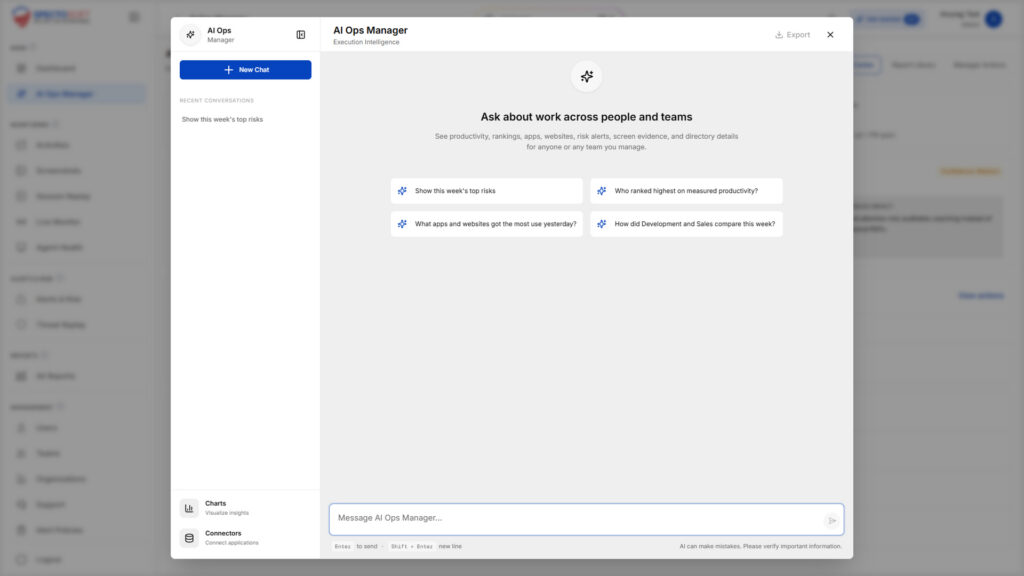
None of this diagnoses burnout, and SpectoSoft doesn’t claim to. What it can do is help surface unusual workload patterns and highlight changes that may warrant a manager’s attention, so the conversation happens earlier, while there’s still time for it to matter.
Human judgment has to stay in the loop
None of this works if AI insight replaces a manager’s judgment instead of feeding it.
If a system flags unusual late-night activity for someone on the team, the right response isn’t to conclude that person is burned out. It’s to ask better questions. Is the workload actually manageable? Is a process bottleneck making things take longer than they should? Is this temporary, or has it become a pattern? Does this person need more support or a redistributed workload?
Those are questions only a conversation can answer. AI-powered workforce intelligence is useful because it points managers toward the right conversations sooner, not because it replaces having them.
Where this is heading
The direction workforce intelligence is heading isn’t toward watching employees more closely. It’s toward helping managers understand what’s actually happening across their teams early enough to do something about it.
Platforms like SpectoSoft show what that shift looks like in practice: workforce activity data that used to sit scattered across logs and dashboards, turned into something a manager can actually act on, ideally before a workload problem becomes a resignation letter.
SpectoSoft turns scattered workforce activity into one AI-powered view of how work actually happens across a team, from workload distribution to after-hours patterns. If workload visibility is something your organization is still piecing together from
spreadsheets, explore SpectoSoft or request a demo to see it on your own team’s data.